



Sandbox and production
How Oktul Code Studio's sandbox reads your site for real and lists every write instead of sending it, and what production runs and records.
Every Oktul Code Studio run is in one of two modes:
- Sandbox reads your site for real and lists every write instead of sending it.
- Production sends everything and records what changed.
The server decides the mode from stored configuration and your role, never from the request.
Sandbox
- Reads go through. The script reads Jira, Confluence and Assets for real, as the run’s principal.
- Writes are recorded, not sent. Each write is matched against Atlassian’s published API, recorded as a change with a sentence a person reads, such as Edit work item ABC-1, and answered with a simulated response. A created object gets an id the script can keep using.
- An unknown write is recorded as unknown, and never sent.
- Other systems. A write to another system is never sent. A read is sent through a connection only when an administrator allowed sandbox reads on it, and directly only to a host the app declares or an administrator approved.
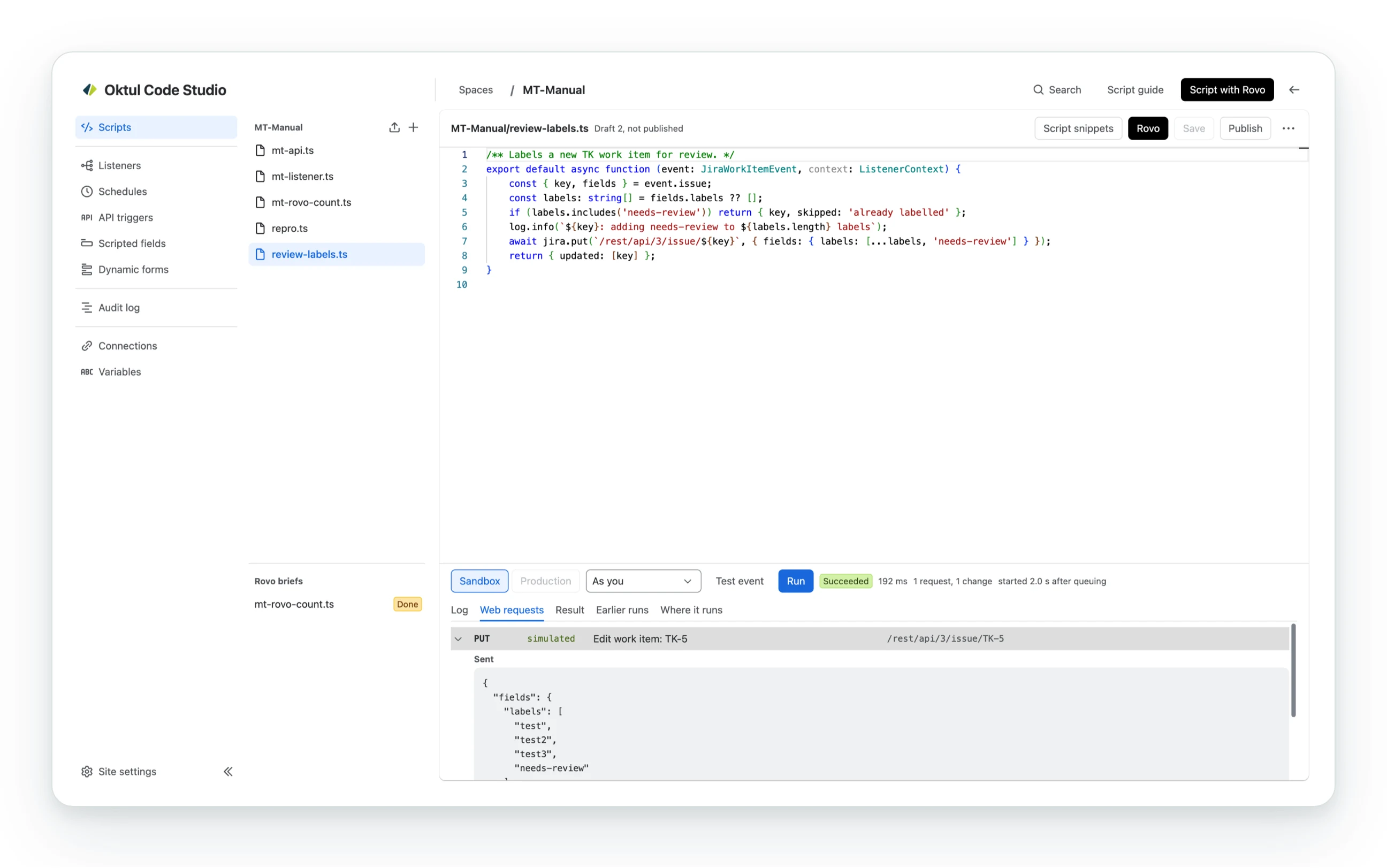
The run panel then shows the log, the result and Web requests: one line per request the run sent, reads included, with its method, its status (or simulated for a sandbox write), what it did and where. Open a line to see what was sent and what came back. A run keeps the response of its first 300 requests and of every one that failed, up to 2,000 characters each, with secrets redacted. A run of thousands of requests lists 200 at a time, and the panel reads the first ten thousand or so.
Earlier runs lists the script’s runs from every trigger. Opening one shows its log, result and web requests in place of the latest run’s, with a bar above the tabs naming when it ran and what started it, and Back to the latest run beside it.
The sandbox reports what the script would have changed against the site as it was. A production run later can differ: the site may have changed, and a script whose path depends on what its writes return sees a simulated answer in the sandbox.
The sandbox holds by construction: no engine reaches the network except through the host that records the writes, so a script cannot route around it.
Production
- Runs only published revisions. Code typed in the console and not yet published never runs in production, for anyone.
- Sends every request, and records every write with the status it got, so the run says what it changed.
- Production is an administrator’s, or a developer’s with Allow developers to run code in production on, for a published script in a space they may edit.
Whom a run acts as
A run’s product requests run as the app or as the person who started it (Forge’s offline impersonation, so their permissions apply).
- A developer’s console run always acts as the developer.
- An administrator chooses their own account or the app’s. The app reads whatever its scopes reach, which is more than a developer may see.
- A listener, schedule, rule or API trigger states its principal in its own settings.
Stopping and continuing
- A run still waiting in the queue is cancelled, with Cancel, and ends at once as Cancelled: nothing can start it afterwards.
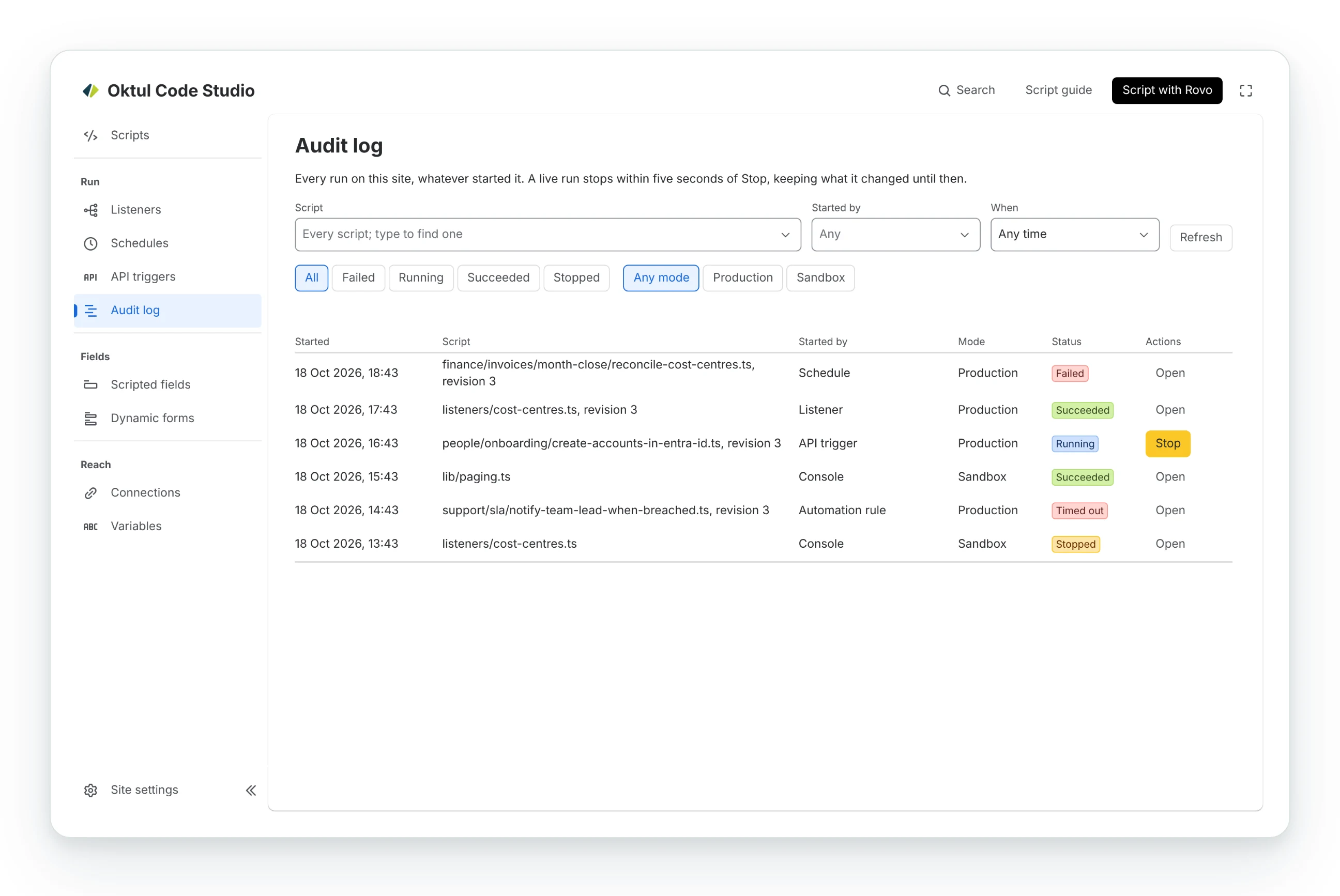
- Any run can be stopped from the console, the runs list or the listener that started it. It
stops within 7 seconds, a tight loop with no
awaitincluded. Stopping a production run takes the same right on the script’s space as starting one. - A long run continues itself. The engine stops 30 seconds before the invocation’s 900 seconds run out, and a new invocation replays the script against the record of every answer it was given, so nothing is sent twice, then carries on live. At most three continuations, about an hour; a run that would need a fourth is stopped as runaway.
context.checkpoint(state)in a long loop keeps the replay short.
Common questions
- Does a sandbox run change anything?
- No. Reads go through for real, and every write is recorded under Web requests and answered with a simulated response instead of being sent.
- Will a production run do exactly what the sandbox showed?
- Not always. The site may have changed in between, and a script that branches on what its writes return sees a simulated answer in the sandbox.
- Who can run a script in production?
- An administrator, or a developer when Allow developers to run code in production is on, for a published script in a space they may edit.
- Can I stop a running script?
- Yes, from the console, the runs list or the listener that started it. It stops within 7 seconds, a loop with no
awaitincluded.
Related
A problem or a question? Write to support@oktul.com or open a request in the Help Center (opens in a new tab).