



Add the macro to a page
Inserting the Work Item Macro on a Confluence page, writing its JQL query, choosing the columns, and what readers see.
Each macro has its own JQL, page size and columns. A page can hold several.
Insert and configure it
- Edit the page and type /oktul
Choose Oktul Work Item Macro. It is also in the macro browser, under the + in the toolbar.
- Select the macro, then the pencil icon on it
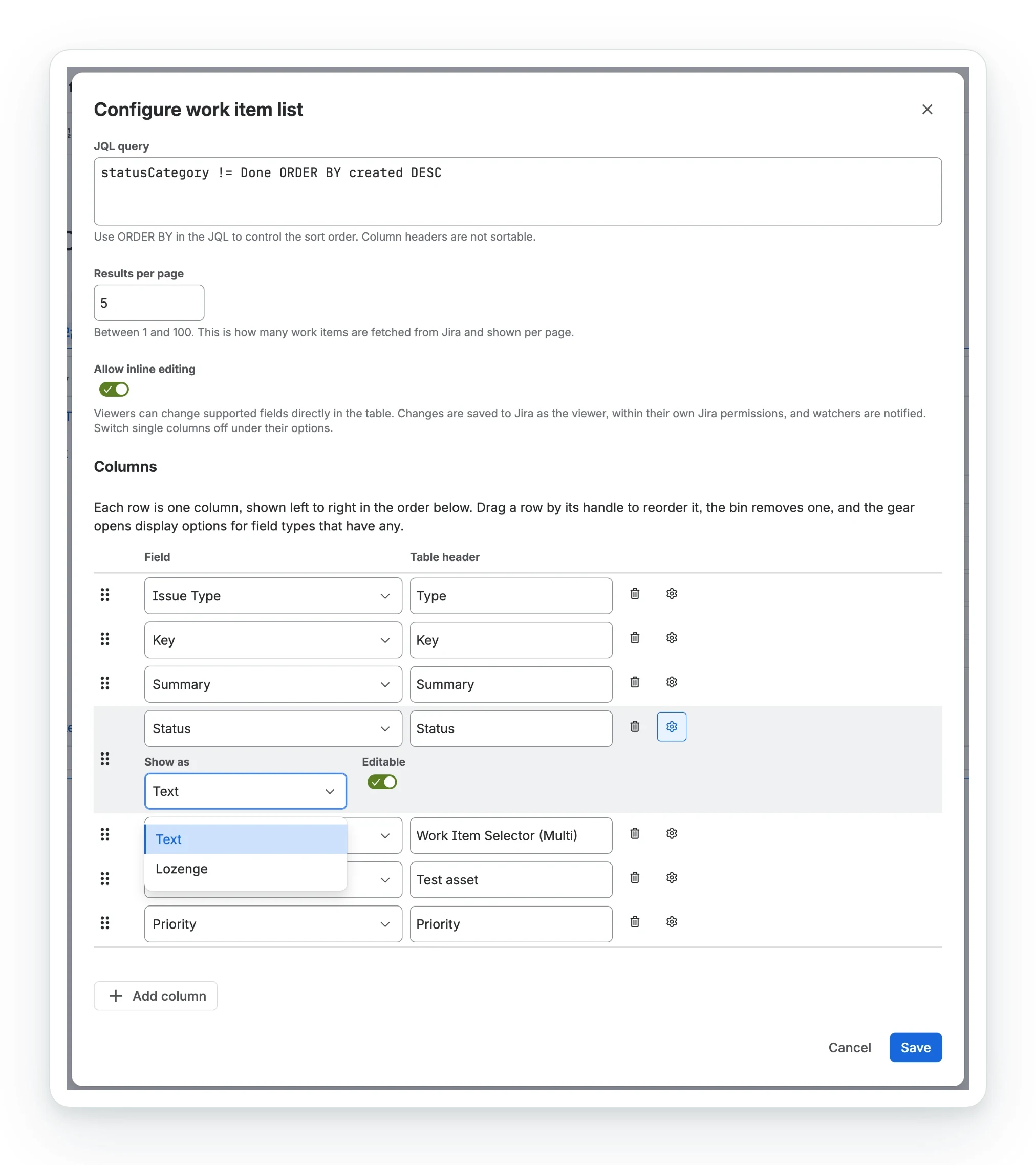
The Configure work item list dialog opens and loads the list of Jira fields.
- Write the JQL query
Any JQL that Jira’s own search accepts. Put the sort order in it with ORDER BY.
- Set the results per page
Between 1 and 100, 25 by default.
- Choose the columns, then Save
A new macro starts with Type, Key, Summary and Status. The table redraws a few seconds after you save.
The configuration
| Setting | What it does |
|---|---|
| JQL query | Chooses the work items and their order. Its ORDER BY is the order every reader sees until they sort by a heading, and the order of every export. |
| Results per page | How many work items are fetched from Jira at a time, and shown per page. 1 to 100. |
| Allow inline editing | Advanced edition only, off by default. Lets readers edit fields in the table. See inline editing. |
| Columns | One row per column, shown left to right in the order of the rows. |
Each column row has a Field (searchable; duplicates show their id), a Table header, a drag handle, a bin, and a gear for display options. One field can fill several columns, such as an Assets label in one and an attribute in the next.
What is checked before saving
Save lists what to fix: no JQL, a page size outside 1 to 100, no columns, a column without a field, or more than seven card fields on a Work Item Selector column. Jira checks the JQL itself when the page loads.
Could not load Jira fields keeps Save disabled. The app is usually not connected to Jira. See install the app.
What readers see
- The footer shows Page 1 of 3 · 62 work items, with Refresh, Previous and Next. The total is Jira’s approximate count.
- Each reader sees their own rows, as Jira’s permissions allow, live.
- Dates look like Confluence’s (Sep 22, 2026, 13:03), in the reader’s language and time zone. A due date is the same day everywhere.
Sort by a column
Select a heading: A to Z, then Z to A, then back to the JQL’s order. Jira sorts the whole list, not just the rows on screen.
- The sort is for that reader only, until they reload. Exports keep the JQL’s
ORDER BY. - Jira cannot sort every field. If a sort fails, Clear sorting goes back.
Messages on the page
| Message | Meaning |
|---|---|
| Configure this macro | The macro has no JQL query or no usable column yet. |
| Jira rejected the JQL | Jira’s own error follows, as Jira words it. Fix the query in the configuration. |
| No work items match this JQL. | The query ran and found nothing this reader can see. |
| App not installed in Jira | The app is not connected to Jira on this site. See install the app. |
| Cannot reach Jira | Jira refused the search with HTTP 401, 403 or 404: the app is not connected to Jira, or the reader cannot browse a project the JQL names. See install the app. |
| Could not load work items | Any other failure, with Jira’s reason. Try again runs the search again without reloading the page; while a sort is on, the message offers Clear sorting instead. |
| App license is not active | The subscription has lapsed. See licensing. |
A failed Assets or Work Item Selector lookup affects only its cell, with the reason in a tooltip.
The table runs in the browser, so look in the developer console for Loading work items failed and its code. Send that line to support.
Common questions
- How do I add the Work Item Macro to a page?
- Edit the page, type
/oktul, choose Oktul Work Item Macro, then select the pencil icon to write the JQL and choose the columns. - How many work items does a page of results show?
- Between 1 and 100, 25 by default, with Previous and Next for the rest.
- Can a page hold several macros?
- Yes. Each has its own JQL, page size and columns.