



After signing: check, download, cancel
What SignPlus shows on a signed Confluence page, how an edit after signing shows, where the signed file is, and who can cancel or delete a signing.
What the video shows
- The title: Know when a signed page changes.
- A signed page reads Page signed and valid in the byline. Its tooltip says the page has not been modified since.
- Someone changes the payment term from 30 to 45 days. The byline changes to Page signed but modified.
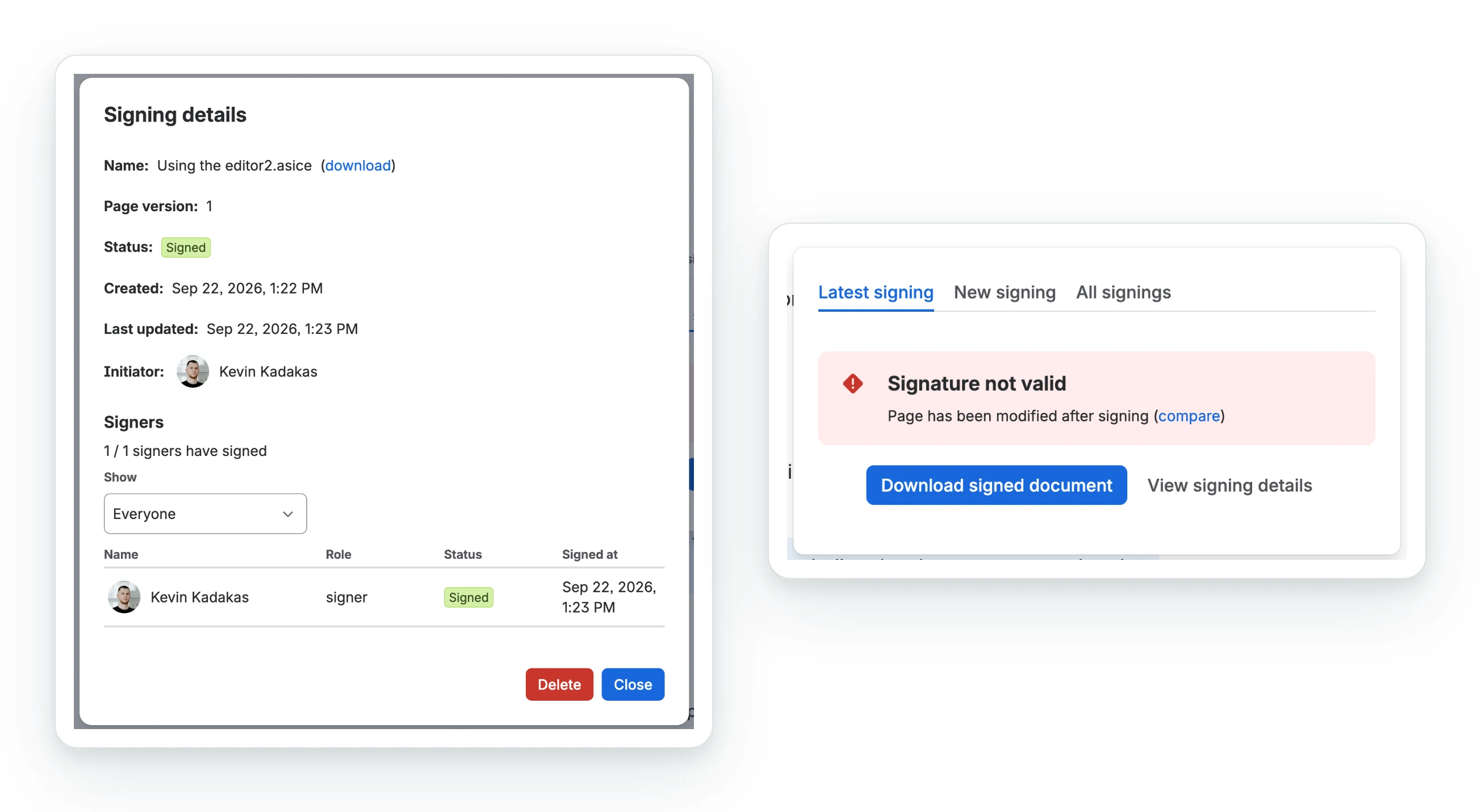
- The panel says the signature is not valid, with a link to compare. The comparison of version 7 with version 8 strikes out 30 and adds 45.
- The signed document still says 30 days, with the signature on it.
- Oktul, Atlassian Marketplace Partner.
A signed page says whether it still matches what was signed: the SignPlus item under the title changes its icon and its words, for anyone who can view the page.
What the byline says
| Byline | Meaning |
|---|---|
| Sign this page | No signing on this page, or the latest one was declined |
| Signing in progress | Out for signature, and the page has not changed since it was sent |
| Page modified during signing | Out for signature, and someone has edited the page since it was sent |
| Page signed and valid | Everyone has signed, and the page is exactly what they signed |
| Page signed but modified | Everyone has signed, and the page has been edited since |
Hover for details; select it to open the panel.
What the panel says
Latest signing shows the newest signing on the page:
| Heading | Under it |
|---|---|
| Signature pending | Signing in progress, and how many of the signers have signed, for example 0 / 1 signers have signed |
| Page modified | Page has been modified during signing, with a compare link |
| Signature valid | Page has not been modified after signing |
| Signature not valid | Page has been modified after signing, with a compare link |
| Signature declined | A signer declined to sign the document |
compare opens Confluence’s comparison of the signed and current versions.
SignPlus stores a SHA-256 of the page’s space id, page id and version, and compares it. Every edit moves the version.
- It detects that the page changed, not what changed.
- Styling changes do not count. The document’s own SHA-256 goes to Dokobit separately.
- It also runs when a signed page is saved, and can notify another system: see the signed-page webhook.
Where the signed file is
The signed file is attached to the page as Service agreement.asice or .pdf. Get it from:
- Download signed document on the Latest signing tab;
- the page’s own attachments;
- Actions, then Download, on SignPlus: your signings;
- the download link in the signing’s details.
Signing details
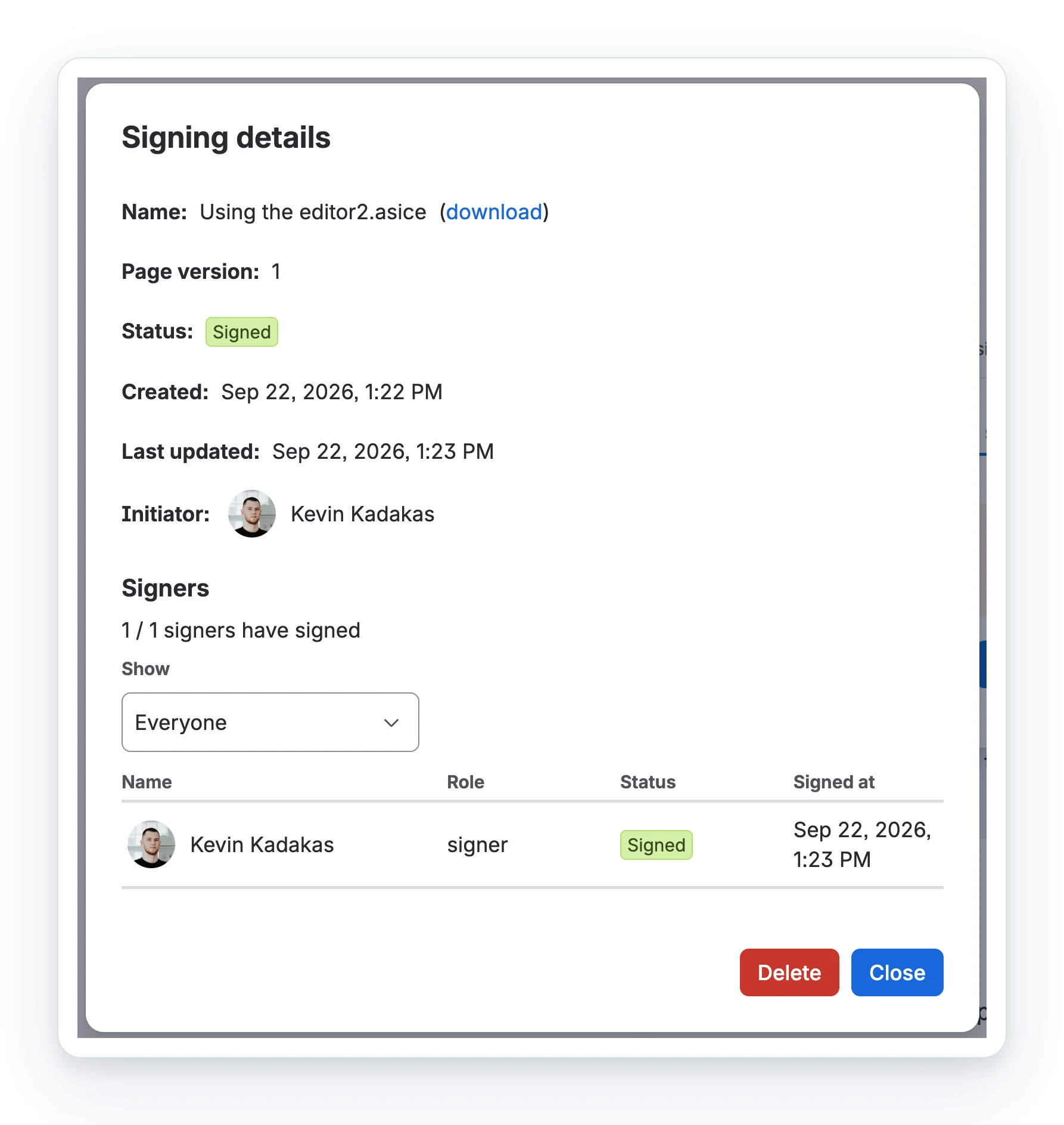
View signing details shows the document, the page version sent, the status and who started it, then every signer with role, status and time.
Under Signers:
- How many have signed, and everyone with their role, status and signing time.
- Show narrows the list to Not signed yet, Signed or Declined: the way to find who to chase on a signing sent to hundreds of people.
- Each group the signing went to, with how many of its members were Invited.
- A hundred people at a time, with Load more for the rest.
All signings opens the same details for older signings.
Cancelling or deleting a signing
The details dialog offers one, to those allowed:
| Detail | Cancel signing | Delete |
|---|---|---|
| Offered | While the signing is still out | Once it has finished: signed or declined |
| What it does | Removes the document from Dokobit, lifts the restrictions and removes the record | Removes the document from Dokobit, lifts the edit lock and removes the record. The signed file stays on the page |
| Who can | The person who started it, or anyone who can edit the page | A Confluence administrator. The site can add space administrators, page editors or the person who started it: see deleting signings |
- Both ask once more before they act.
- If Dokobit cannot be reached, the page restrictions are still lifted and the record stays, so the action can be tried again.
- Afterwards the byline shows the page’s previous signing, or Sign this page if there was none, once the page is reloaded.
Remove the attachment yourself if needed. Without the record, nothing says the page was signed or whether it changed.
What happens to the page
| When | Edit lock | Viewing restriction |
|---|---|---|
| The signing starts | Applied, if chosen | Applied, if chosen |
| It completes | Stays on | Lifted |
| It is declined | Lifted | Lifted |
| It is cancelled, or its record deleted | Lifted | Lifted |
The edit lock stays after a completed signing so that what people signed cannot change. It is a Confluence page restriction held by SignPlus alone, and Confluence keeps two ways past it: a space administrator can remove it, and on Premium and Enterprise an organisation administrator can bypass it with an audit-logged admin key. An edit made either way still moves the version, so the byline reports it.
Common questions
- How do I know a signed page has not been changed?
- The byline under the title reads Page signed and valid. After an edit it reads Page signed but modified, and the panel links to Confluence's comparison of the two versions.
- Where is the signed document?
- Attached to the page, named after the document, as
.asiceor.pdf. Download signed document on the Latest signing tab fetches it too. - Does changing the export styling make a signed page read as modified?
- No. The check hashes the page's space id, page id and version number, not the rendered document.
- Can a signed page still be edited?
- Only by SignPlus, if the signing locked it. A space administrator can remove the lock, and the byline reports any edit either way.
- Does deleting a signing delete the signed file?
- No. It removes Dokobit's copy and SignPlus's record. The file attached to the page stays.
Related
A problem or a question? Write to support@oktul.com or open a request in the Help Center (opens in a new tab).