



REST API
The SignPlus REST API: start and follow a signing, see who has not signed, export a PDF and fetch the signed document, from Code Studio, a Forge app or curl.
The SignPlus REST API does what the panel on the page does, from another system: start a signing, follow it, list who has not signed, export a PDF and fetch the signed document. It authenticates with an Atlassian service account, and it covers signing only, not Confluence in general.
Every example comes three ways: an Oktul Code Studio script, a Forge app and curl.
Before you start
| You need | Where it comes from |
|---|---|
| SignPlus on your Confluence site | The install guide |
| The API address | SignPlus global settings, API access, then API address. Every site has its own; each endpoint is a path added to it, such as /v1/signings |
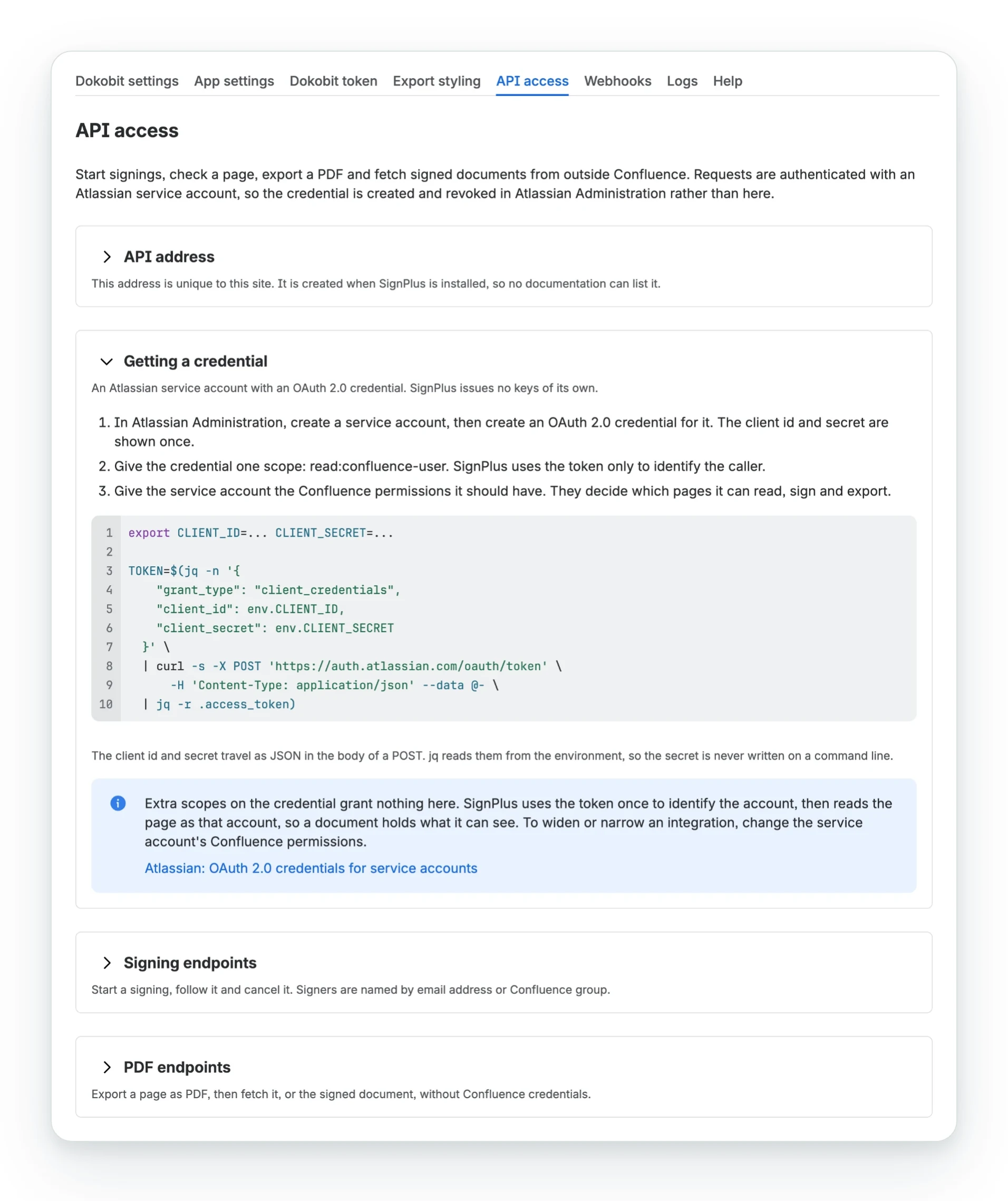
| An Atlassian service account with an OAuth 2.0 credential | An organisation administrator creates it in Atlassian Administration, grants the credential one scope, read:confluence-user, and gives the account the Confluence permissions it needs. Atlassian’s instructions (opens in a new tab) |
The client_id and client_secret are shown once, when the credential is created.
What the service account may do
SignPlus checks the service account’s own Confluence permissions on every request and reads the page as that account. More scopes on the credential grant nothing extra.
| To | The account needs |
|---|---|
| Read a page’s status, its signings, their people, a PDF or a signed document | View the page |
| Start a signing, cancel one, or export a PDF | Edit the page |
| Delete a finished signing | What the site’s deleting signings setting allows |
Because the page is read as the service account, the signed document holds what that account sees: a Jira work items table lists the work items it may see, and an excerpt from a page it cannot open is left out.
Connect a client
Code Studio
Code Studio holds the credential in a connection and adds a fresh token to every request, so a script never sees the secret.
1. In Code Studio, open Connections, select Create connection and choose Any other HTTP API.
| Field | Value |
|---|---|
| Key | signplus, the name every example below uses |
| Base URL | Your site's SignPlus API address |
| Authentication | OAuth 2.0 client credentials |
| Token URL | https://auth.atlassian.com/oauth/token |
| Client ID and secret | The service account's credential |
2. Save, and approve the API address's host in the dialog Atlassian shows. auth.atlassian.com is already allowed.
3. Call SignPlus with http.get, http.post or http.delete and a path such as /v1/signings. Code Studio fetches the token, renews it before it expires and adds it to every request, so a script never holds the secret. A reply of 400 or more throws HttpError, whose status and body carry SignPlus's answer.
Forge
A Forge app declares the two hosts, keeps the credential in encrypted variables and fetches the token itself.
1. Allow the two hosts in manifest.yml. The second is the host of your site's API address.
permissions: external: fetch: backend: - address: auth.atlassian.com - address: your-installation.hello.atlassian.net2. Store the address and the credential as Forge variables. Encrypted variables are never shown again.
forge variables set SIGNPLUS_URL https://your-installation.hello.atlassian.net/x1/...forge variables set --encrypt SIGNPLUS_CLIENT_ID <client id>forge variables set --encrypt SIGNPLUS_CLIENT_SECRET <client secret>3. Add signplus.js, which fetches a token and reuses it until it nears expiry. Every Forge example below imports it.
import { fetch } from '@forge/api';
let cached;
export async function signplusToken() {  if (cached && cached.expires > Date.now() + 60_000) {    return cached.token;  }
  const response = await fetch('https://auth.atlassian.com/oauth/token', {    method: 'POST',    headers: {      'Content-Type': 'application/json'    },    body: JSON.stringify({      grant_type: 'client_credentials',      client_id: process.env.SIGNPLUS_CLIENT_ID,      client_secret: process.env.SIGNPLUS_CLIENT_SECRET    })  });
  if (!response.ok) {    throw new Error(`The token request failed: ${response.status}`);  }
  const { access_token: token, expires_in: seconds } = await response.json();  cached = { token, expires: Date.now() + seconds * 1000 };
  return token;}
curl
Fetch a token with the client id and secret in the body of a POST. They are read from the environment, so the secret never appears on a command line.
export SIGNPLUS_URL="https://513c7988-....hello.atlassian.net/x1/G7gth8r-Vw5-wMfGB7FGgW6AQ9A"export CLIENT_ID=... CLIENT_SECRET=...
export SIGNPLUS_TOKEN=$(jq -n '{grant_type: "client_credentials", client_id: env.CLIENT_ID, client_secret: env.CLIENT_SECRET}' \  | curl -s -X POST 'https://auth.atlassian.com/oauth/token' \      -H 'Content-Type: application/json' --data @- \  | jq -r .access_token)
The token lasts 60 minutes. Fetch a new one when a request answers 401.
Your first signing
Four requests: check the page, start the signing, follow the job, and see who has not signed. A page id is in the page’s address, or under Page information.
1. Check where the page stands
export default async function () { return http.get('signplus', '/v1/pages/123456/status');}import { fetch } from '@forge/api';import { signplusToken } from './signplus';
const response = await fetch(`${process.env.SIGNPLUS_URL}/v1/pages/123456/status`, { headers: { Authorization: `Bearer ${await signplusToken()}` }});console.log(await response.json());curl -s "$SIGNPLUS_URL/v1/pages/123456/status" -H "Authorization: Bearer $SIGNPLUS_TOKEN"{ "pageId": "123456", "spaceId": "98765", "pageVersion": 4, "state": "ready-to-sign", "signings": []}401 means the token is wrong or has expired. 403 means the service account cannot see the page.
2. Start a signing
export default async function () { return http.post('signplus', '/v1/signings', { pageId: '123456', signers: [ { email: 'anna@example.com', name: 'Anna Tamm' }, { group: 'finance-team' }, ], });}import { fetch } from '@forge/api';import { signplusToken } from './signplus';
const response = await fetch(`${process.env.SIGNPLUS_URL}/v1/signings`, { method: 'POST', headers: { Authorization: `Bearer ${await signplusToken()}`, 'Content-Type': 'application/json' }, body: JSON.stringify({ pageId: '123456', signers: [ { email: 'anna@example.com', name: 'Anna Tamm' }, { group: 'finance-team' } ] })});console.log(await response.json());curl -s -X POST "$SIGNPLUS_URL/v1/signings" \ -H "Authorization: Bearer $SIGNPLUS_TOKEN" \ -H "Content-Type: application/json" \ -d '{ "pageId": "123456", "signers": [ { "email": "anna@example.com", "name": "Anna Tamm" }, { "group": "finance-team" } ] }'{ "jobId": "7c1e9a0f3b2d4c5e6f7a8b9c", "status": "queued", "pageId": "123456", "statusUrl": "/v1/pages/123456/signing-jobs/7c1e9a0f3b2d4c5e6f7a8b9c"}The answer is 202 Accepted. The request has passed the space’s settings, and the signing is
prepared in the background: the page is rendered, each group is expanded into its members, and
everyone is sent to Dokobit. That takes seconds for a few people and minutes for thousands.
3. Follow the job
export default async function () { return http.get('signplus', '/v1/pages/123456/signing-jobs/7c1e9a0f3b2d4c5e6f7a8b9c');}import { fetch } from '@forge/api';import { signplusToken } from './signplus';
const response = await fetch(`${process.env.SIGNPLUS_URL}/v1/pages/123456/signing-jobs/7c1e9a0f3b2d4c5e6f7a8b9c`, { headers: { Authorization: `Bearer ${await signplusToken()}` }});console.log(await response.json());curl -s "$SIGNPLUS_URL/v1/pages/123456/signing-jobs/7c1e9a0f3b2d4c5e6f7a8b9c" \ -H "Authorization: Bearer $SIGNPLUS_TOKEN"{ "id": "7c1e9a0f3b2d4c5e6f7a8b9c", "status": "started", "reference": "a3f9c2d1e4b5a6978877665544332211", "documentName": "Expense policy"}status |
Means |
|---|---|
queued, running |
Still being prepared |
started |
Dokobit has it and the invitations are out. Keep the reference: the other endpoints take it |
failed |
It did not start. message says why |
4. See who has not signed
export default async function () { const { signers } = await http.get('signplus', '/v1/signings/a3f9c2d1e4b5a6978877665544332211/signers', { query: { pageId: '123456', status: 'pending' }, }); return signers.map((signer) => `${signer.name} <${signer.email}>`);}import { fetch } from '@forge/api';import { signplusToken } from './signplus';
const response = await fetch(`${process.env.SIGNPLUS_URL}/v1/signings/a3f9c2d1e4b5a6978877665544332211/signers?pageId=123456&status=pending`, { headers: { Authorization: `Bearer ${await signplusToken()}` }});const { signers } = await response.json();console.log(signers.map((signer) => `${signer.name} <${signer.email}>`));curl -s "$SIGNPLUS_URL/v1/signings/a3f9c2d1e4b5a6978877665544332211/signers?pageId=123456&status=pending" \ -H "Authorization: Bearer $SIGNPLUS_TOKEN" | jq -r '.signers[] | [.name, .email] | @tsv'A signing takes minutes or days. Configure the completion webhook instead, and SignPlus sends you the signed document when it exists.
Authentication and limits
Every request carries one header, Authorization: Bearer <access token>. Basic authentication is
not supported.
- Every authentication failure answers the same
401, so the API cannot be used to find out which tokens are live. - A revoked credential stops working within two minutes. SignPlus remembers a verified token for two minutes, then asks Atlassian again. Revoke the credential in Atlassian Administration to stop an integration.
- A token from another Atlassian organisation is refused by Atlassian itself.
| Limit | Value |
|---|---|
| Rate | 60 requests per minute per account, then 429 |
| Request body | 2MB, then 413 |
| People on one signing | 25,000, after groups are expanded |
| People named one by one in a view restriction | 200. A group counts as one |
| People in one reply | 100 by default, any number with limit; nextCursor reaches the rest |
| Document returned inline | 4MB. Above it contentBase64 is null, never truncated |
| Time | 55 seconds per request. A signing is queued, so it is not bound by this |
Every request, a refused one included, is recorded under Logs in the global settings: what was called, the outcome and the account it acted as, never the token. Two kinds are not recorded: a body over 2MB or not valid JSON, and any request while the site has no active licence.
Operations
Every reply is JSON, errors included. Every operation that takes a reference also needs
pageId, so a reference from one page cannot reach a signing on another. Identifiers are checked
before anything reads them: a page id is a number, a reference 32 characters of 0-9 and a-f, a
job id 24. Anything else answers 400.
| Operation | Does | Needs |
|---|---|---|
POST /v1/signings |
Queues a signing. 202 and a job |
Edit |
POST /v1/pages/{pageId}/signings |
The same, with the page in the path | Edit |
GET /v1/pages/{pageId}/signing-jobs/{jobId} |
How a queued signing went. Kept for 7 days | The account that queued it |
GET /v1/pages/{pageId}/status |
Where a page stands, and its signings, newest first | View |
GET /v1/signings/{reference}?pageId= |
One signing, with counts rather than its people | View |
GET /v1/signings/{reference}/signers?pageId= |
The people on a signing, a page at a time | View |
GET /v1/signings |
Signings on a page with ?pageId=, or every signing the account started |
View |
DELETE /v1/signings/{reference}?pageId= |
Cancels a running signing, or deletes a finished one | See the operation |
POST /v1/pages/{pageId}/pdf |
Exports the page as PDF and attaches it | Edit |
GET /v1/pages/{pageId}/pdf/{attachmentId} |
A document SignPlus attached to the page | View |
GET /v1/signings/{reference}/document?pageId= |
The signed document, once everyone has signed | View |
Signing operations
Start a signing
POST/v1/signings
Queues a signing and answers at once with a job to follow. Needs a page and at least one signer: a person by email address, or a Confluence group by name or id, which invites every member. A Confluence user who can view the page is added as that user, anyone else as an external signer. Everything else falls back to what the space is configured with.
- Permissions required
- Edit the page.
- Credential scope
read:confluence-user
Request
Request body, application/json
| Name | Description |
|---|---|
pageIdRequiredstring | The page to sign. Or name it in the path instead: POST /v1/pages/{pageId}/signings. |
signersRequiredarray<object> | Who signs or views it. At least one, and up to 25,000 people once groups are expanded. |
signers[].emailstring | A person. Required unless the entry names a group. |
signers[].namestring | Their name, as Dokobit shows it. |
signers[].groupstring | A Confluence group the account belongs to, by name or id, instead of an email. Every member is invited. |
signers[].rolestring | signer, the default, or viewer. |
namestring | The document name. The page title by default, with a number added when the page already has an attachment of that name. |
typestring | pdf, asice, bdoc, edoc or adoc, from those the space allows. The space default by default. |
messagestring | Sent to signers. The space may require it or forbid it. |
deadlinestring | ISO 8601 date and time with an offset, in the future. |
hardDeadlineboolean | Refuse signatures after the deadline. The space may decide. |
lockPageboolean | Only SignPlus may edit the page from now on. The space may decide. |
restrictViewersboolean | Only the participants may view the page until it is signed. The space may decide. |
includeAttachmentsboolean | Append the page's attachments to the document. The space may decide. |
Example request
export default async function () { return http.post('signplus', '/v1/signings', { pageId: '123456', signers: [ { email: 'anna@example.com', name: 'Anna Tamm', }, { group: 'finance-team', }, { email: 'jaan@example.com', name: 'Jaan Kask', role: 'viewer', }, ], name: 'Expense policy 2026', message: 'Please sign by Friday', deadline: '2026-12-31T17:00:00+02:00', });}import { fetch } from '@forge/api';import { signplusToken } from './signplus';
var bodyData = `{ "pageId": "123456", "signers": [ { "email": "anna@example.com", "name": "Anna Tamm" }, { "group": "finance-team" }, { "email": "jaan@example.com", "name": "Jaan Kask", "role": "viewer" } ], "name": "Expense policy 2026", "message": "Please sign by Friday", "deadline": "2026-12-31T17:00:00+02:00"}`;
const response = await fetch(`${process.env.SIGNPLUS_URL}/v1/signings`, { method: 'POST', headers: { 'Authorization': `Bearer ${await signplusToken()}`, 'Accept': 'application/json', 'Content-Type': 'application/json' }, body: bodyData});
console.log(`Response: ${response.status} ${response.statusText}`);console.log(await response.json());curl -X POST "$SIGNPLUS_URL/v1/signings" \ -H "Authorization: Bearer $SIGNPLUS_TOKEN" \ -H "Content-Type: application/json" \ -d '{ "pageId": "123456", "signers": [ { "email": "anna@example.com", "name": "Anna Tamm" }, { "group": "finance-team" }, { "email": "jaan@example.com", "name": "Jaan Kask", "role": "viewer" } ], "name": "Expense policy 2026", "message": "Please sign by Friday", "deadline": "2026-12-31T17:00:00+02:00" }'Responses
| Status | Means |
|---|---|
| 202 Accepted | Queued. Follow statusUrl until the job has a reference. |
| 400 Bad Request | A field is missing, or the space does not allow what was asked. The error says which. |
| 403 Forbidden | This account cannot edit the page, or names a group it does not belong to. |
| 404 Not Found | The page does not exist. |
| 503 Service Unavailable | This site cannot sign yet, for example because no Dokobit token is set. |
{ "jobId": "7c1e9a0f3b2d4c5e6f7a8b9c", "status": "queued", "pageId": "123456", "statusUrl": "/v1/pages/123456/signing-jobs/7c1e9a0f3b2d4c5e6f7a8b9c"}Get a signing job
GET/v1/pages/{pageId}/signing-jobs/{jobId}
How a queued signing went: queued or running while it is prepared, started with the signing reference once Dokobit has it, or failed with the reason.
- Permissions required
- Be the account that queued the job.
- Credential scope
read:confluence-user
Request
Path parameters
| Name | Description |
|---|---|
pageIdRequiredstring | The Confluence page. |
jobIdRequiredstring | The jobId from Start a signing. |
Example request
export default async function () { return http.get('signplus', '/v1/pages/123456/signing-jobs/7c1e9a0f3b2d4c5e6f7a8b9c');}import { fetch } from '@forge/api';import { signplusToken } from './signplus';
const response = await fetch(`${process.env.SIGNPLUS_URL}/v1/pages/123456/signing-jobs/7c1e9a0f3b2d4c5e6f7a8b9c`, { headers: { 'Authorization': `Bearer ${await signplusToken()}`, 'Accept': 'application/json' }});
console.log(`Response: ${response.status} ${response.statusText}`);console.log(await response.json());curl "$SIGNPLUS_URL/v1/pages/123456/signing-jobs/7c1e9a0f3b2d4c5e6f7a8b9c" \ -H "Authorization: Bearer $SIGNPLUS_TOKEN"Responses
| Status | Means |
|---|---|
| 200 OK | status is queued, running, started with reference set, or failed with the reason in message. |
| 404 Not Found | This account queued no job with that ID on this page. A job is kept for seven days. |
{ "id": "7c1e9a0f3b2d4c5e6f7a8b9c", "documentName": "Expense policy 2026", "status": "started", "reference": "a3f9c2d1e4b5a6978877665544332211", "created": "2026-10-02T09:00:00.000Z", "updated": "2026-10-02T09:01:12.000Z"}Get a page's signing state
GET/v1/pages/{pageId}/status
Where a page stands: ready to sign, pending, signed, or signed and edited since. Returns the page's signings, newest first, a hundred at a time.
- Permissions required
- View the page.
- Credential scope
read:confluence-user
Request
Path parameters
| Name | Description |
|---|---|
pageIdRequiredstring | The Confluence page. |
Example request
export default async function () { return http.get('signplus', '/v1/pages/123456/status');}import { fetch } from '@forge/api';import { signplusToken } from './signplus';
const response = await fetch(`${process.env.SIGNPLUS_URL}/v1/pages/123456/status`, { headers: { 'Authorization': `Bearer ${await signplusToken()}`, 'Accept': 'application/json' }});
console.log(`Response: ${response.status} ${response.statusText}`);console.log(await response.json());curl "$SIGNPLUS_URL/v1/pages/123456/status" \ -H "Authorization: Bearer $SIGNPLUS_TOKEN"Responses
| Status | Means |
|---|---|
| 200 OK | state is ready-to-sign, pending-unmodified, pending-modified, signed-valid, signed-modified, declined or unknown. The newest signing decides it. |
| 403 Forbidden | This account cannot view the page. |
| 404 Not Found | The page does not exist. |
| 502 Bad Gateway | Confluence did not return the page version. Try again. |
{ "pageId": "123456", "spaceId": "98307", "pageVersion": 8, "state": "signed-modified", "signings": [ { "reference": "a3f9c2d1e4b5a6978877665544332211", "status": "completed", "documentName": "Expense policy 2026", "signedVersion": 7, "modifiedSinceSigning": true, "created": "2026-10-02T09:01:12.000Z", "updated": "2026-10-03T11:30:00.000Z" } ], "nextCursor": "eyJpZCI6..."}Get a signing
GET/v1/signings/{reference}
One signing: its state, how many were asked and how many have signed, and the groups it went to.
- Permissions required
- View the page.
- Credential scope
read:confluence-user
Request
Path parameters
| Name | Description |
|---|---|
referenceRequiredstring | The signing reference, from the job or from a list of signings. |
Query parameters
| Name | Description |
|---|---|
pageIdRequiredstring | The page the signing is on. |
Example request
export default async function () { return http.get('signplus', '/v1/signings/a3f9c2d1e4b5a6978877665544332211', { query: { pageId: '123456' } });}import { fetch } from '@forge/api';import { signplusToken } from './signplus';
const response = await fetch(`${process.env.SIGNPLUS_URL}/v1/signings/a3f9c2d1e4b5a6978877665544332211?pageId=123456`, { headers: { 'Authorization': `Bearer ${await signplusToken()}`, 'Accept': 'application/json' }});
console.log(`Response: ${response.status} ${response.statusText}`);console.log(await response.json());curl "$SIGNPLUS_URL/v1/signings/a3f9c2d1e4b5a6978877665544332211?pageId=123456" \ -H "Authorization: Bearer $SIGNPLUS_TOKEN"Responses
| Status | Means |
|---|---|
| 200 OK | The signing, with counts rather than its people. |
| 400 Bad Request | pageId is missing. |
| 403 Forbidden | This account cannot view the page. |
| 404 Not Found | No signing with that reference is on this page. |
{ "reference": "a3f9c2d1e4b5a6978877665544332211", "spaceId": "98307", "spaceName": "Human Resources", "spaceUrl": "https://your-site.atlassian.net/wiki/spaces/HR", "spaceIconUrl": "https://your-site.atlassian.net/wiki/download/attachments/.../space-icon", "pageId": "123456", "pageName": "Expense policy", "pageVersion": 7, "pageHash": "8f14e4...", "initiatorAccountId": "5f1b...", "signingStatus": "pending", "documentName": "Expense policy 2026", "documentType": "pdf", "progress": { "total": 1204, "required": 1203, "signed": 911, "declined": 2 }, "groups": [ { "id": "0f6a...", "name": "finance-team", "role": "signer", "members": 1202 } ], "created": "2026-10-02T09:01:12.000Z", "updated": "2026-10-02T14:20:45.000Z"}Get the people on a signing
GET/v1/signings/{reference}/signers
The people on a signing, with their email addresses, 100 a page unless limit= asks for more. Add status=pending, signed or declined to list only those. Repeat email= or accountId= to check specific people, as many as you need. Anyone never asked to sign is listed in notFound. Follow nextCursor until it is absent to read everybody. A person whose Atlassian account was closed is listed with an empty name and no address.
- Permissions required
- View the page.
- Credential scope
read:confluence-user
Request
Path parameters
| Name | Description |
|---|---|
referenceRequiredstring | The signing reference, from the job or from a list of signings. |
Query parameters
| Name | Description |
|---|---|
pageIdRequiredstring | The page the signing is on. |
limitinteger | People per reply. 100 by default, and any whole number above 0. |
cursorstring | The nextCursor of the previous reply. |
statusstring | pending, signed or declined, to list only those. |
emailstring | Repeat it to ask about specific people by address. |
accountIdstring | Repeat it to ask about specific Confluence users. |
Example request
export default async function () { return http.get('signplus', '/v1/signings/a3f9c2d1e4b5a6978877665544332211/signers', { query: { pageId: '123456', status: 'pending' } });}import { fetch } from '@forge/api';import { signplusToken } from './signplus';
const response = await fetch(`${process.env.SIGNPLUS_URL}/v1/signings/a3f9c2d1e4b5a6978877665544332211/signers?pageId=123456&status=pending`, { headers: { 'Authorization': `Bearer ${await signplusToken()}`, 'Accept': 'application/json' }});
console.log(`Response: ${response.status} ${response.statusText}`);console.log(await response.json());curl "$SIGNPLUS_URL/v1/signings/a3f9c2d1e4b5a6978877665544332211/signers?pageId=123456&status=pending" \ -H "Authorization: Bearer $SIGNPLUS_TOKEN"Responses
| Status | Means |
|---|---|
| 200 OK | signers, and nextCursor while there are more. A page can hold fewer than limit. With email or accountId, notFound lists anyone never asked. |
| 400 Bad Request | pageId is missing, limit is not a whole number above 0, or the cursor belongs to another query. |
| 403 Forbidden | This account cannot view the page. |
| 404 Not Found | No signing with that reference is on this page. |
{ "signers": [ { "external_id": "5f1b...", "name": "Mari Maasikas", "email": "mari.maasikas@example.com", "role": "signer", "status": "pending", "group": "finance-team" } ], "nextCursor": "eyJpZCI6..."}List signings
GET/v1/signings
Every signing on a page. Without pageId, every signing the service account started. Paginate with the cursor from the previous reply.
- Permissions required
- View the page when pageId is given. Without it, only your own signings are listed.
- Credential scope
read:confluence-user
Request
Query parameters
| Name | Description |
|---|---|
pageIdstring | Every signing on this page. Without it, every signing this account started. |
cursorstring | The nextCursor of the previous reply. |
Example request
export default async function () { return http.get('signplus', '/v1/signings', { query: { pageId: '123456' } });}import { fetch } from '@forge/api';import { signplusToken } from './signplus';
const response = await fetch(`${process.env.SIGNPLUS_URL}/v1/signings?pageId=123456`, { headers: { 'Authorization': `Bearer ${await signplusToken()}`, 'Accept': 'application/json' }});
console.log(`Response: ${response.status} ${response.statusText}`);console.log(await response.json());curl "$SIGNPLUS_URL/v1/signings?pageId=123456" \ -H "Authorization: Bearer $SIGNPLUS_TOKEN"Responses
| Status | Means |
|---|---|
| 200 OK | signings, newest first, 100 a reply, and nextCursor while there are more. |
| 403 Forbidden | This account cannot view the page. |
{ "signings": [ { "reference": "a3f9c2d1e4b5a6978877665544332211", "spaceId": "98307", "spaceName": "Human Resources", "spaceUrl": "https://your-site.atlassian.net/wiki/spaces/HR", "spaceIconUrl": "https://your-site.atlassian.net/wiki/download/attachments/.../space-icon", "pageId": "123456", "pageName": "Expense policy", "pageVersion": 7, "pageHash": "8f14e4...", "initiatorAccountId": "5f1b...", "signingStatus": "pending", "documentName": "Expense policy 2026", "documentType": "pdf", "progress": { "total": 1204, "required": 1203, "signed": 911, "declined": 2 }, "groups": [ { "id": "0f6a...", "name": "finance-team", "role": "signer", "members": 1202 } ], "created": "2026-10-02T09:01:12.000Z", "updated": "2026-10-02T14:20:45.000Z" } ], "nextCursor": "eyJpZCI6..."}Cancel a signing
DELETE/v1/signings/{reference}
Cancels a signing and removes it from Dokobit for every signer. Page restrictions come off. A document already signed stays attached to the page.
- Permissions required
- Running: have started it, or be able to edit the page. Finished: be a Confluence administrator, or someone the site allows on the Deleting signings setting.
- Credential scope
read:confluence-user
Request
Path parameters
| Name | Description |
|---|---|
referenceRequiredstring | The signing reference, from the job or from a list of signings. |
Query parameters
| Name | Description |
|---|---|
pageIdRequiredstring | The page the signing is on. |
Example request
export default async function () { return http.delete('signplus', '/v1/signings/a3f9c2d1e4b5a6978877665544332211', { query: { pageId: '123456' } });}import { fetch } from '@forge/api';import { signplusToken } from './signplus';
const response = await fetch(`${process.env.SIGNPLUS_URL}/v1/signings/a3f9c2d1e4b5a6978877665544332211?pageId=123456`, { method: 'DELETE', headers: { 'Authorization': `Bearer ${await signplusToken()}`, 'Accept': 'application/json' }});
console.log(`Response: ${response.status} ${response.statusText}`);console.log(await response.json());curl -X DELETE "$SIGNPLUS_URL/v1/signings/a3f9c2d1e4b5a6978877665544332211?pageId=123456" \ -H "Authorization: Bearer $SIGNPLUS_TOKEN"Responses
| Status | Means |
|---|---|
| 200 OK | Cancelled, and removed from Dokobit and from SignPlus. |
| 202 Accepted | A signing of more than 500 people is being cancelled in the background, with status "cancelling". It stops being listed once it is done. |
| 400 Bad Request | pageId is missing. |
| 403 Forbidden | This account cannot view the page, or may not cancel or delete this signing. See the permission above. |
| 404 Not Found | No signing with that reference is on this page. |
| 502 Bad Gateway | Dokobit could not be reached, or the page restrictions could not be put back. The signing's record stays, so send it again. |
{ "reference": "a3f9c2d1e4b5a6978877665544332211", "status": "cancelled"}PDF operations
Export a page as PDF
POST/v1/pages/{pageId}/pdf
Exports the page with this site's styling and attaches the PDF to it. Keep the attachmentId to fetch it later. Add ?inline=true for the bytes in this reply as well, up to 4MB.
- Permissions required
- Edit the page.
- Credential scope
read:confluence-user
Request
Path parameters
| Name | Description |
|---|---|
pageIdRequiredstring | The Confluence page. |
Query parameters
| Name | Description |
|---|---|
inlineboolean | true to return the PDF in contentBase64 as well, up to 4MB. |
Request body, application/json
| Name | Description |
|---|---|
namestring | Names the attached PDF, and is shown by the {documentName} placeholder in a header or footer. The page title by default, with a number added when the page already has a file of that name. |
includeAttachmentsboolean | Append the page's attachments. The space may decide. |
Example request
export default async function () { return http.post('signplus', '/v1/pages/123456/pdf', { name: 'Supplier agreement', includeAttachments: true, }, { query: { inline: 'true' } });}import { fetch } from '@forge/api';import { signplusToken } from './signplus';
var bodyData = `{ "name": "Supplier agreement", "includeAttachments": true}`;
const response = await fetch(`${process.env.SIGNPLUS_URL}/v1/pages/123456/pdf?inline=true`, { method: 'POST', headers: { 'Authorization': `Bearer ${await signplusToken()}`, 'Accept': 'application/json', 'Content-Type': 'application/json' }, body: bodyData});
console.log(`Response: ${response.status} ${response.statusText}`);console.log(await response.json());curl -X POST "$SIGNPLUS_URL/v1/pages/123456/pdf?inline=true" \ -H "Authorization: Bearer $SIGNPLUS_TOKEN" \ -H "Content-Type: application/json" \ -d '{ "name": "Supplier agreement", "includeAttachments": true }'Responses
| Status | Means |
|---|---|
| 201 Created | Exported and attached to the page. |
| 403 Forbidden | This account cannot add attachments to the page. |
| 404 Not Found | The page does not exist. |
| 502 Bad Gateway | SignPlus could not read the page as this account, so no PDF was made. |
{ "attachmentId": "att98765", "fileName": "Supplier agreement.pdf", "downloadUrl": "https://your-site.atlassian.net/wiki/download/attachments/...", "sizeBytes": 184320, "contentBase64": "JVBERi0xLjcK..."}Get an exported PDF
GET/v1/pages/{pageId}/pdf/{attachmentId}
Fetches a PDF SignPlus attached to the page, as base64. Only documents SignPlus made are served, and only from the page named.
- Permissions required
- View the page.
- Credential scope
read:confluence-user
Request
Path parameters
| Name | Description |
|---|---|
pageIdRequiredstring | The Confluence page. |
attachmentIdRequiredstring | The attachmentId from Export a page as PDF. |
Example request
export default async function () { return http.get('signplus', '/v1/pages/123456/pdf/att98765');}import { fetch } from '@forge/api';import { signplusToken } from './signplus';
const response = await fetch(`${process.env.SIGNPLUS_URL}/v1/pages/123456/pdf/att98765`, { headers: { 'Authorization': `Bearer ${await signplusToken()}`, 'Accept': 'application/json' }});
console.log(`Response: ${response.status} ${response.statusText}`);console.log(await response.json());curl "$SIGNPLUS_URL/v1/pages/123456/pdf/att98765" \ -H "Authorization: Bearer $SIGNPLUS_TOKEN"Responses
| Status | Means |
|---|---|
| 200 OK | The PDF in contentBase64. Over 4MB, contentBase64 is null and inlineRefused says why. |
| 403 Forbidden | This account cannot view the page. |
| 404 Not Found | SignPlus has not attached a document with that ID to this page. |
{ "attachmentId": "att98765", "fileName": "Supplier agreement.pdf", "mediaType": "application/pdf", "sizeBytes": 184320, "downloadUrl": "https://your-site.atlassian.net/wiki/download/attachments/...", "contentBase64": "JVBERi0xLjcK..."}Get the signed document
GET/v1/signings/{reference}/document
Fetches the signed document once every signer has signed, as base64. Before that it answers 409.
- Permissions required
- View the page.
- Credential scope
read:confluence-user
Request
Path parameters
| Name | Description |
|---|---|
referenceRequiredstring | The signing reference, from the job or from a list of signings. |
Query parameters
| Name | Description |
|---|---|
pageIdRequiredstring | The page the signing is on. |
Example request
export default async function () { return http.get('signplus', '/v1/signings/a3f9c2d1e4b5a6978877665544332211/document', { query: { pageId: '123456' } });}import { fetch } from '@forge/api';import { signplusToken } from './signplus';
const response = await fetch(`${process.env.SIGNPLUS_URL}/v1/signings/a3f9c2d1e4b5a6978877665544332211/document?pageId=123456`, { headers: { 'Authorization': `Bearer ${await signplusToken()}`, 'Accept': 'application/json' }});
console.log(`Response: ${response.status} ${response.statusText}`);console.log(await response.json());curl "$SIGNPLUS_URL/v1/signings/a3f9c2d1e4b5a6978877665544332211/document?pageId=123456" \ -H "Authorization: Bearer $SIGNPLUS_TOKEN"Responses
| Status | Means |
|---|---|
| 200 OK | The signed document in contentBase64. Over 4MB, contentBase64 is null and inlineRefused says why. |
| 400 Bad Request | pageId is missing. |
| 403 Forbidden | This account cannot view the page. |
| 404 Not Found | No signing with that reference is on this page, or its document is no longer attached. |
| 409 Conflict | Not every signer has signed yet. |
{ "reference": "a3f9c2d1e4b5a6978877665544332211", "attachmentId": "att98770", "fileName": "Supplier agreement.pdf", "mediaType": "application/pdf", "sizeBytes": 201733, "downloadUrl": "https://your-site.atlassian.net/wiki/download/attachments/...", "contentBase64": "JVBERi0xLjcK..."}More on the operations
Who a signer is
A signer is a person or a group, with role signer (the default) or viewer. A person needs
both email and name; one without a name is refused with 400.
[ { "email": "anna@example.com", "name": "Anna Tamm", "role": "signer" }, { "group": "finance-team", "role": "signer" }, { "groupId": "0f6a1b2c-...", "role": "viewer" }]- A person is named by email address. An address that belongs to a Confluence user who can
view the page adds that user; anyone else signs as an external signer. Confluence cannot be
searched by address, so the match is made by
nameand confirmed against the account’s own address, for up to 100 addresses in one request. Past 100, every address signs as an external signer, and an external signer cannot be named in a view restriction. - A group is named by its name or its id, and every member is invited with the group’s role. A
member Confluence gives no address for cannot be invited, and the job’s
messagesays how many. The service account may name only groups it belongs to, as a person in the panel may. Any other group answers403before anything is queued. spaceIdis not a field. SignPlus asks Confluence which space the page is in, so a caller cannot choose which space’s rules apply.- Text is cleaned and held to a length. Control characters and the Unicode controls that
reorder text are removed from names, the document name and the message. A document name is at
most 200 characters and loses
\ / : * ? " < > |, because it becomes a file name. A message is at most 2,000 characters, a name 200.
What a page’s state means
The newest signing decides it, by the byline’s hash.
state |
Means |
|---|---|
ready-to-sign |
Nothing has been started on this page |
pending-unmodified |
A signing is out and the page has not changed |
pending-modified |
A signing is out and the page has changed since it was sent |
signed-valid |
Signed, and the page is exactly what was signed |
signed-modified |
Signed, and the page has been edited since |
declined |
A signer refused |
unknown |
The stored status is not one of the above |
Reading the people on a signing
A reply can come back shorter than limit when reading more would outrun the request’s time, so
only an absent nextCursor means you have everyone. Ask about at most 1,000 people by email or
accountId in one request.
This is the one place SignPlus returns a signer’s email address, to an account that can view the page, because chasing the people who have not signed needs it. The panel on the page never sends one to a browser.
Cancelling and deleting
- A running signing is cancelled: removed from Dokobit for every signer, with its page restrictions lifted.
- A finished signing is deleted: removed from Dokobit for every signer, with its edit lock lifted, and its record goes.
The signed file stays attached to the page either way, and the same permissions apply as in the
panel: see cancelling or deleting a signing.
A 502 means Dokobit could not be reached or the page restrictions could not be put back. The
record stays, and sending the request again is safe.
Errors
| Status | Means |
|---|---|
400 |
Something is missing, an identifier is not in its form, or the space’s rules refuse it. error says which |
401 |
The token is not valid here. Every reason answers the same way |
402 |
The site has no active SignPlus licence |
403 |
The service account cannot reach the page or may not do that to it, names a group it does not belong to, or SignPlus itself may not edit the page |
404 |
No such page, signing, job, document or path |
405 |
That path does not take that method |
409 |
The signing has no signed document yet |
413 |
The body is over 2MB |
429 |
Over 60 requests in a minute for this account |
500 |
Something failed inside SignPlus. The detail is in the app’s logs, never in the reply |
502 |
Dokobit refused or could not be reached, or SignPlus could not read the page as the service account |
503 |
Signing is not configured on this site, for example no Dokobit token |
{ "error": "At least one signer is required in \"signers\"."}In Code Studio, a status of 400 or more throws HttpError; its status is the code and its
body the JSON above.
What the API never returns
- Dokobit tokens, for the document or a signer. The
referenceis part of a SHA-256 of the document token and cannot be reversed. - A stored document. None is stored; the PDF endpoints read it from the page.
Common problems
| Symptom | Cause |
|---|---|
| A script that works on the sandbox site fails in production | The API address is per installation. Use production’s |
Every page answers 403 |
The service account has a credential but no Confluence permissions on the page |
POST /v1/signings gave no reference |
A signing is queued. Follow the job, or use the completion webhook |
400 mentioning a format or a message |
The space’s SignPlus settings refuse it |
| The signed document is watermarked | The site is in Test signing mode, which signs with Dokobit’s test identities only |
401 after working for a while |
The token expired after 60 minutes. Fetch a new one |
When you ask for help with a signing, quote its reference: it identifies the signing and
reveals nothing about its contents.
Common questions
- How does the SignPlus REST API authenticate?
- With an OAuth 2.0 access token from an Atlassian service account, sent as
Authorization: Bearer <token>. SignPlus issues no API keys of its own, and a token lasts 60 minutes. - Where is the SignPlus API address?
- In SignPlus's global settings, under API access, then API address. Atlassian creates it for each installation, so every site has its own.
- Does starting a signing through the API return the signing at once?
- No.
POST /v1/signingsanswers202 Acceptedwith a job id. Follow the job, or the completion webhook, for the signing'sreference. - Can I get the signed PDF through the API?
- Yes, with
GET /v1/signings/{reference}/document?pageId=once everyone has signed. Before that it answers409. - How many requests can the API take?
- 60 a minute for each account, answered with
429past that. A request body is at most 2MB and a request at most 55 seconds.
Related
- Automation and webhooks
- Sign a page
- Code Studio: requests to other systems
- Privacy and data handling
A problem or a question? Write to support@oktul.com or open a request in the Help Center (opens in a new tab).